
tl;dr: how to stop OS X from shipping your location to Apple’s servers every time you use Spotlight.

I like using the Spotlight function of OS X — it is a fast way to get at my files — but it also sends my geolocation to Apple every time I search. This blogpost will be about how to disable or at least prevent the built-in Spotlight search from sending your IP-based location to Apple’s servers.
Proof of concept#
But first have a look at what’s being sent:
GET /search?q=asd&latlng=48.082000,8.640000&geosrc=wifi,155.643824&storefront=143443-4,13&locale=de-DE&time_zone=Europe/Berlin&calendar=gregorian&key=montana4289 HTTP/1.1
Host: api.smoot.apple.com
This request was captured during a Burp session.
What you can see here in the Parameters
- q is the Query you send to the Apple Servers
- latlng is the Latitude and the Longitude of your current (IP) location
I think it’s needless to say that this information should stay private (at least in my opinion). If you want to keep your searches fancy you can stop reading here, preventing the geolocation will change your search experience but you will gain some privacy back.
Setting it up#
First way: the hosts file#
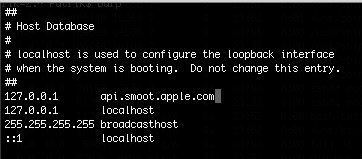
The /etc/hosts is a local text file that tells the system how to resolve an IP-Address to a Domain. The clue here is to point the Apple domain api.smoot.apple.com to the localhost address of your machine (127.0.0.1). This will tell the system to resolve every request to api.smoot.apple.com to the localhost address, thus leading nowhere. To do so:
- Open a terminal
- sudo vim /etc/hosts
- Add the line
127.0.0.1 api.smoot.apple.com - Flush the DNS cache with
sudo discoveryutil mdnsflushcache - All set.
Second way: Little Snitch#
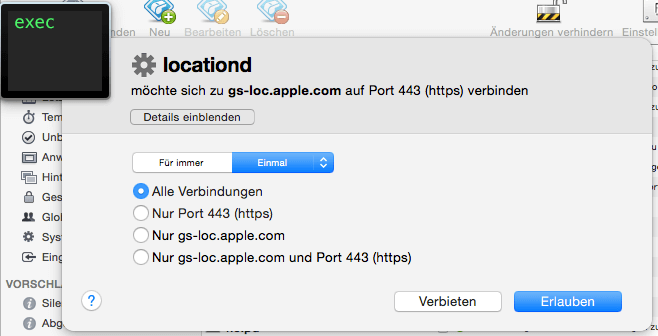
I don’t want to promote anything here, but the Little Snitch software is worth buying. Little Snitch helps you to organize every incoming and outgoing connection, you can simply add a rule for the Spotlight search:
You want to disable the locationd Service that tries to connect to gs-loc.apple.com – forever.
You are done — privacy saved.